Appearance
How to set a custom receipt number pattern
Every receipt gets a number. A new library starts with numbers like REC2610001 (REC, the year and month, then a serial number). Until you save your own pattern, Receipt numbering says so in a blue note and shows this default. A pattern lets you use your own format, such as DSS-2610-0001.
Who can do thisOwner, Org admin by default, or any staff role given Org Settings → Manage in Settings → Staff role permissions.
Set your receipt number pattern
- In the left menu, click Settings.
- On the Organization tab, click Receipt Generator and scroll to Receipt numbering.
- Choose a Generation method: Custom pattern, Default template or Serial numbers.
- For a custom pattern, click Pattern components to add them in order, such as Year (2 digits), Current Month (2 digits) and Serial Number (configurable digits).
- Optional: enter a Prefix, Suffix and Separator.
- Check the Live preview, then click Save changes.
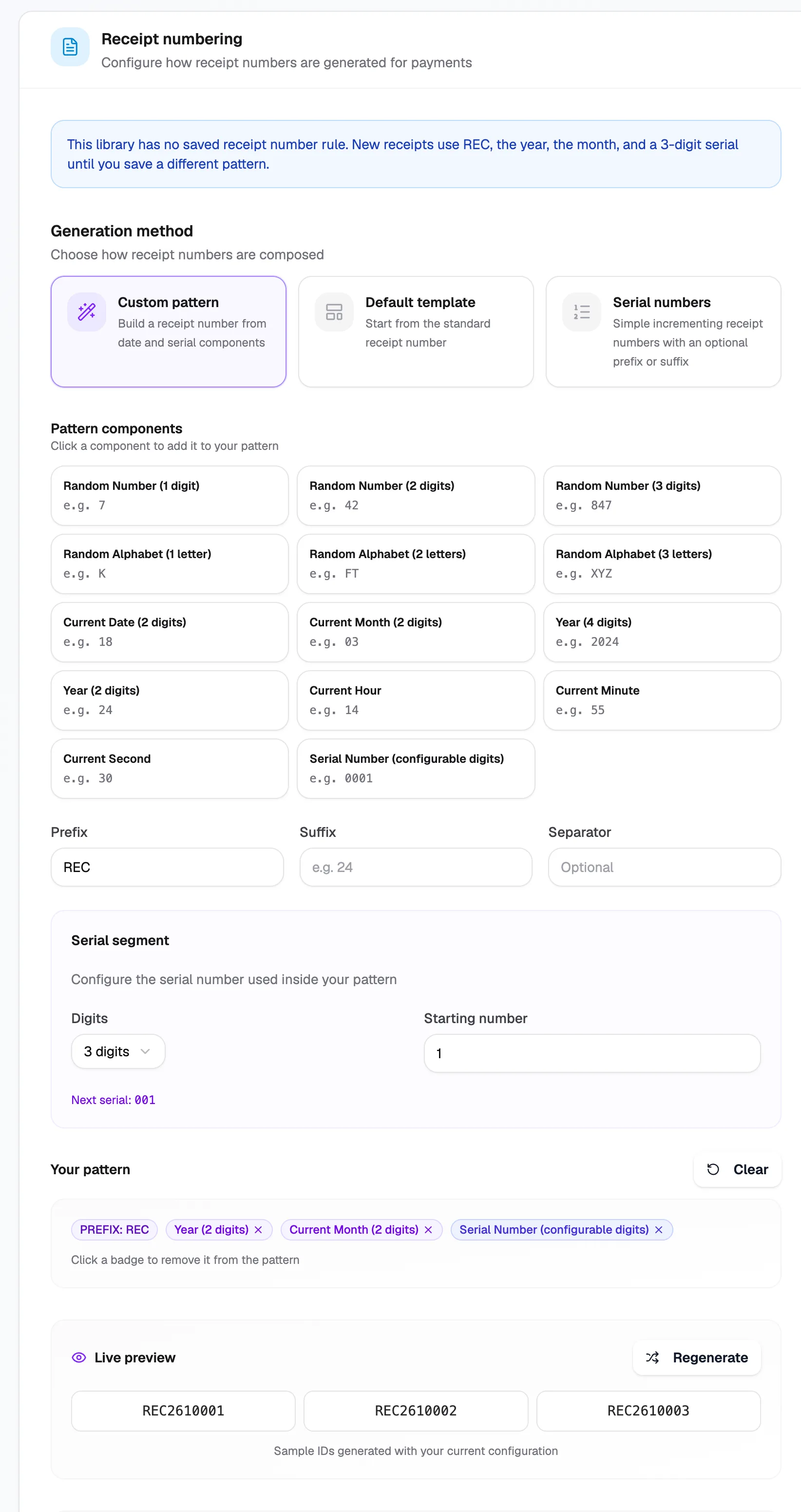
- Generation methodCustom, template or serial
- PrefixText at the start, such as DSS
- Live previewSample receipt numbers
Receipt numbering works the same way as member IDs, and the screen uses some of the same wording. See How to set a custom UID pattern for every pattern part.
What happens next
New receipts use the new pattern. Existing receipts keep their numbers.