Appearance
How to renew your seat
Renew before your Valid Until date so you keep your seat. You can renew any time, not only when it says it's expiring.
Renew one seat
- Open My Seats.
- On your seat, tap Renew.
- Under Renewal period, choose how long: 1 month, +1 month or +2 months. Use − to go back down.
- Check the New expiry date and the Total payable.
- Tap Proceed to payment and pay. See How to pay.
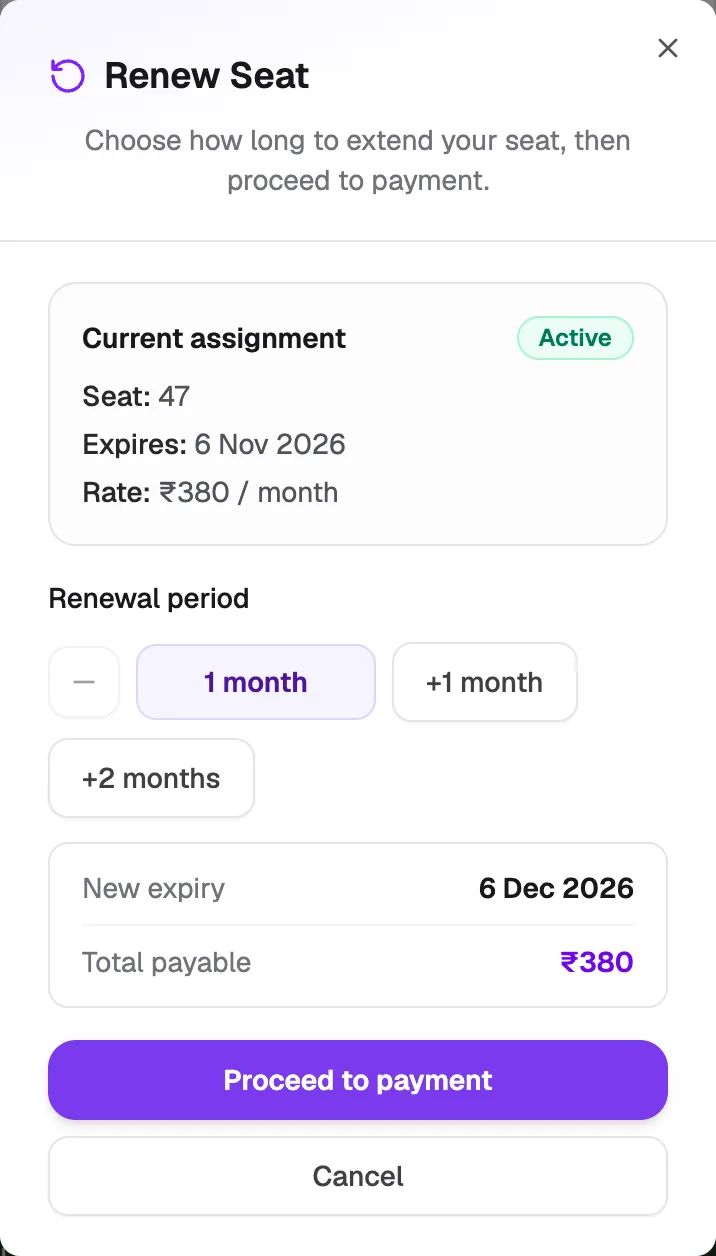
- Renewal periodHow many months
- New expiryYour new last day
- Proceed to paymentGoes to checkout
For a seat booked by the hour, you renew in 24-hour blocks instead, and the dialog shows the Daily rate.
Renew several seats at once
If you have two or more seats to renew:
- On My Seats, tap Renew Seats.
- Tick the seats you want to renew, then tap Continue.
- Choose the renewal period, check the amounts and pay.
What happens next
After you pay, the seat's Valid Until date moves to the new expiry. If you pay at the desk or by UPI QR, it updates once your library confirms the payment.