Library seat management software for study libraries
Library seat management software keeps one live record of every seat: who holds it, in which shift or hours, and until when. Librarify is library management software for self-study libraries and reading rooms in India, with a seat map, shifts and hourly slots, expiry reminders and a student website for online seat booking.
Updated · By Pankaj Kumar, founder of Librarify
What does library seat management software do?
It keeps one live record of every seat, so you stop answering "is this seat free?" from memory. Here is what changes.
Seat map
Before: A register page per shift, and two students told the same seat.
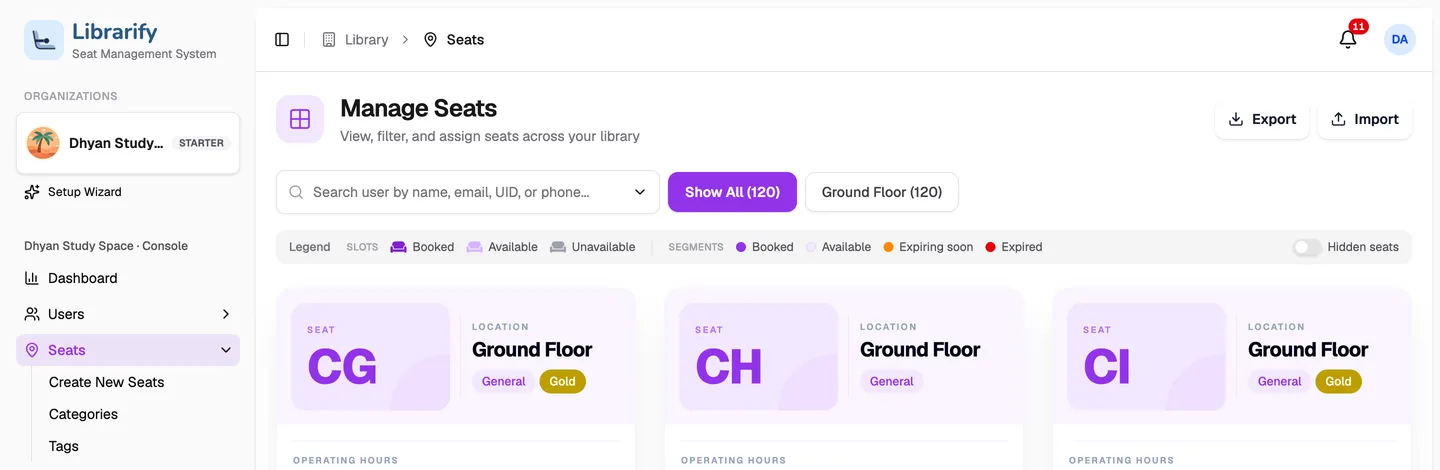
With Librarify: One seat map. Every seat shows which shifts are booked, free or about to expire.
Shifts
Before: One student per seat, even when the seat sits empty half the day.
With Librarify: Split the day into shifts with their own prices, and sell the same seat more than once.
Hourly seats
Before: Turning away students who only need a few hours.
With Librarify: Turn on hourly booking for chosen seats and charge by the hour.
Expiry
Before: Scrolling an Excel sheet to see whose month ends this week.
With Librarify: Seats show as expiring soon or expired, and students get reminders on WhatsApp and email.
Changes
Before: Crossing out register entries when a student moves.
With Librarify: Edit a booking's dates, hours or price, or renew it in one dialog.
Student booking
Before: Calls asking which seats are free and what they cost.
With Librarify: Students see seats and prices on your library website and book there.
How does the seat map work?
Every seat on the map shows its slots as booked, available, expiring soon or expired. Click a free slot to book it for a student, or click several to book more than one at once. Search by name, phone or UID to find where a student sits.
How to book a seat for a member
How do you manage shifts and hourly seats?
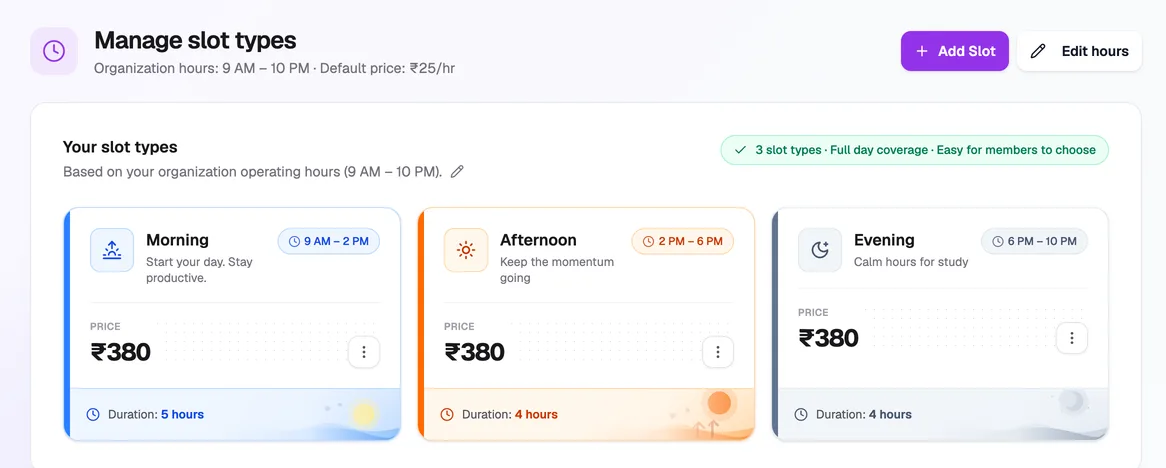
Set your opening hours, then split them into slot types such as morning, afternoon and evening. Each slot type has its own hours and price, and one seat can go to a different student in each. For students who come in for a few hours, turn on hourly booking for chosen seats and set an hourly rate.
How slot types work · How hourly booking works
What happens when a seat expires or a student moves?
Students get a WhatsApp and email message before their seat expires, and again if it lapses, so fewer renewals slip. When a student pays again, renew the booking in one dialog. When something was entered wrong, change the booking's dates, hours or price without starting over.
Choose which reminders go out · Renew a booking
Can students book seats themselves?
Yes. Every library on Librarify gets its own website, at yourlibrary.librarify.in or on a domain you already own. Students see your seats and prices, reserve a seat or a locker, pay online and download receipts. What they do lands in the same seat map your staff use.
See the library website · How students reserve a seat
How much does seat management cost?
Priced per library, not per student. Starter covers up to 250 seats and Pro up to 500.
Choose Plan
Switch between plans and intervals anytime.
Refund within 7 days (monthly) or 30 days (yearly).
A free trial is not a paid plan. The refund window starts only after a paid plan starts.
Starter
Basic plan for startersPer month, per library
Per year, per library
- ✓ WhatsApp and Email renewal notice
- ✓ Website
- ✓ Custom Domain
- ✓ Customizations
- ✓ Custom UID and Receipt Generator
- ✓ Unique Subdomain
- ✓ User Roles
- ✓ Four Payment Integrations
- ✓ Auto Assignments of Seats
Pro🔥 Most Popular
Pro plan for bigger librariesPer month, per library
Per year, per library
- ✓ All in Starter plan +
- ✓ Multiple website templates
- ✓ Multiple email templates
- ✓ Multiple Receipt templates
- ✓ AI features (coming soon)
Is it right for your library?
- A good fit if you run shifts, sell seats by the hour, or have more students than you can track in your head.
- Maybe not yet if you have under 20 seats and one fixed timing. A register may be enough for now.
- Bigger libraries: if you have more than 500 seats or several branches, contact us.
For the wider picture, see self-study library software and how Librarify compares with other library apps in India.
Questions about library seat management software
- What is library seat management software?
- It is software that tracks every seat in a paid study library: which student holds it, in which shift or hours, until what date, and whether they have paid. It replaces the paper register and the Excel sheet, and it stops the same seat being sold twice.
- Can the same seat be given to different students in different shifts?
- Yes. Split your opening hours into shifts, such as morning, afternoon and evening, each with its own price. One seat can be booked by a different student in each shift. Slots that overlap cannot be booked together.
- Can students book seats by the hour?
- Yes. Turn on hourly booking for the seats you choose and set an hourly rate. Students then book the exact hours they need, such as 6 PM to 9 PM, instead of a fixed shift.
- How do I know which seats are about to expire?
- The seat map shows each seat's slots as booked, available, expiring soon or expired, so you can see at a glance whose booking ends this week. Search by a student's name, phone or UID to find their seat.
- Can students book seats themselves?
- Yes. Every library gets its own website where students see your seats and prices, reserve a seat or locker, renew and pay online. Their booking lands in the same seat map your staff use.
- Can I fix a wrong seat booking?
- Yes. From the Assignments page you can change a booking's dates, hours or price at any time. You can also correct its dates from the seat card, with a note saying why.
- How much does it cost?
- Librarify is priced per library, with monthly and yearly billing. Starter covers up to 250 seats and Pro up to 500. Students do not pay Librarify. Current prices are on the pricing page.