Librarify for study centers and libraries
Library management software for your self-study library
Librarify manages seats across shifts and hourly slots, renewals, fee payments, and WhatsApp and email reminders. Every library also gets its own website where students reserve seats and renew online.
No card required — includes the Starter plan. Or see pricing
Preview of the Librarify seats workspace, with filters and a live seat card.
- Renewals and dues tracking
- Shift and hourly slots
- Payments and receipts
- Email and WhatsApp reminders
- Staff roles and permissions
Run your center with less chasing and more clarity
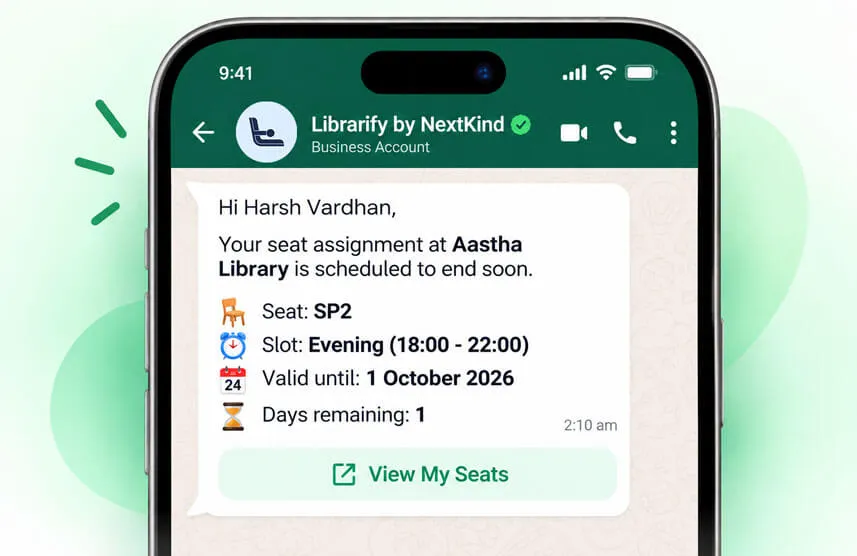
Reminders go out for you
Expiry and dues reminders go to members by email and WhatsApp, so the front desk stops sending the same message by hand.
Every seat, every shift, at a glance
Assign one seat across morning, afternoon, and evening slots and see exactly which hours are booked and which are open, without a paper register.
Seat
A-01
Location
Quiet Zone
Operating hours
Sample view
Payments and receipts in one place
Record what each member paid against their seat and keep a clean receipt trail, instead of scattered notes and chat threads.
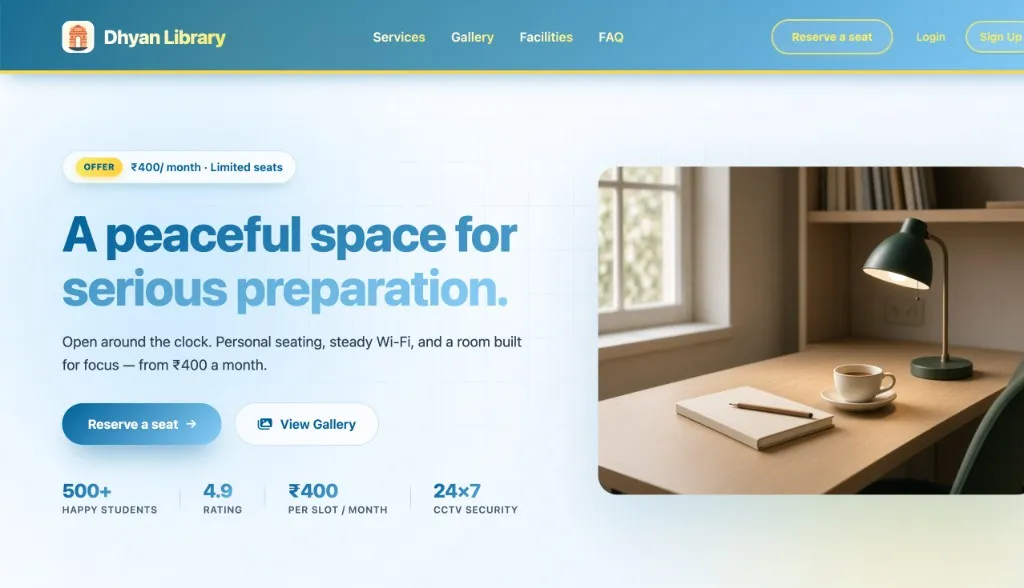
Your Library's website under your own name
Every center starts on its own Librarify subdomain. Optionally you can connect a domain you already own, such as dhyanlibrary.com, and students open your branded website.
No card required — includes the Starter plan.
Everything a study center needs, in one place
Renewals and dues
See who is expiring or has dues pending, and renew a seat in a few taps.
Shift and hourly slots
Assign one seat across morning, afternoon, and evening shifts with a clear time bar.
Payments and receipts
Record payments against each assignment and keep a receipt trail for members.
Locker management
Assign lockers to members and renew them from the same desk as seats.
Email notifications
Automatic email updates for sign-ups, renewals, and payments.
WhatsApp reminders
Nudge members about expiry and dues on WhatsApp, where they already are.
Staff roles and permissions
Give managers and front-desk staff exactly the access they need.
Your own public page
A Librarify subdomain for your center, or a domain you already own, for the site students see.
Custom seat colors
Pick a theme color so seat cards match your center's look.
Your team, your rules
The right access for every person on your team
Invite managers and front-desk staff with roles and permissions, so everyone sees what they need to do their job and nothing more.
Pricing that scales with you
Flexible plans for every stage, from a single study room to multiple branches.
Choose Plan
Switch between plans and intervals anytime.
Refund within 7 days (monthly) or 30 days (yearly).
A free trial is not a paid plan. The refund window starts only after a paid plan starts.
Starter
Basic plan for startersPer month, per library
- WhatsApp and Email renewal notice
- Website
- Custom Domain
- Customizations
- Custom UID and Receipt Generator
- Unique Subdomain
- User Roles
- Four Payment Integrations
- Auto Assignments of Seats
Pro🔥 Most Popular
Pro plan for bigger librariesPer month, per library
- All in Starter plan +
- Multiple website templates
- Multiple email templates
- Multiple Receipt templates
- AI features (coming soon)
Quick answers, before you start
Straight answers on setup, plans, and how teams use Librarify day to day.
A library management system for study libraries (also called library management software) is an app that runs a self-study library or reading room: which student sits on which seat in which shift, when each membership expires, who has paid, and who needs a reminder. It replaces the paper register, Excel sheet, and WhatsApp follow-ups.
Librarify is library management software for self-study libraries, reading rooms, and study centers in India. It manages seats across shifts and hourly slots, renewals, fee payments and receipts, lockers, staff roles, and WhatsApp and email reminders from one dashboard.
Yes. Every library on Librarify gets its own website, on a Librarify subdomain or a domain you already own. Students use it to see their seat, reserve a new seat, renew their membership, pay, and open their locker without calling the front desk.
Yes. One seat can be assigned across morning, afternoon, evening, and night shifts, or booked by the hour. The seat map shows which slots are free, so the same seat can earn from more than one student a day.
Librarify is priced per library, not per seat or per student, with monthly and yearly billing. Students do not pay for Librarify. Current plan prices are on the pricing page.
No. Librarify (librarify.in) is a separate product and company. It is not related to Librify (librify.in) or to Librarika.
No. Librarify runs in the browser. Your team signs in and starts configuring seats, plans, and members. There are no local servers or desktop installs.
Yes. You can start with a free trial and set up your seats before choosing a plan. See the pricing section for plan details.
Yes. Switch between plans as your seat count and team size change. Billing intervals and plan features are listed on the pricing page.
Yes. Invite staff and give each person a role, so owners, managers, and front-desk teams work on the same live seat and member data with the right level of access.
Run your study center from one dashboard
Set up your seats, add your members, and give your staff one source of truth for renewals and payments.
No card required — includes the Starter plan.
- No hidden seat fees on core plans
- Support that understands library workflows