Self-study library software for seats, fees and renewals
Librarify is self-study library software for library owners in India. It tracks which student sits on which seat in which shift, warns you before memberships expire, records fees with receipts, and sends WhatsApp and email reminders. Students get your library's own website to book and renew seats.
Updated 24 Oct 2026 · By Pankaj Kumar, founder of Librarify
What does self-study library software do?
It takes over the daily jobs that run on a register, an Excel sheet and your phone. Here is what changes.
Seats and shifts
Before: A register page per shift, and two students told the same seat.
With Librarify: One seat map. Each seat shows which shifts are booked, free or about to expire.
Expiry dates
Before: Scrolling an Excel sheet to see whose month ends this week.
With Librarify: Seats turn orange when they're expiring soon and red when they've expired.
Fees and receipts
Before: Cash in a drawer, UPI screenshots on a phone, receipts written by hand.
With Librarify: Every payment is recorded against the seat, with a numbered PDF receipt.
Reminders
Before: Messaging each student on WhatsApp, one by one.
With Librarify: WhatsApp and email reminders before a seat expires and when a payment is due.
Staff
Before: One login shared by everyone at the desk.
With Librarify: Each staff member signs in with a role, and you choose what each role can see and change.
Student questions
Before: Calls asking if a seat is free and what it costs.
With Librarify: Your library website shows seats and prices, and students book and renew there.
How do you manage shifts and hourly seats?
Set your opening hours, then split them into slot types such as morning, afternoon and evening. Each slot type has its own hours and price, and one seat can go to a different student in each. For students who come in for a few hours, turn on hourly booking for chosen seats and set an hourly rate.
How slot types work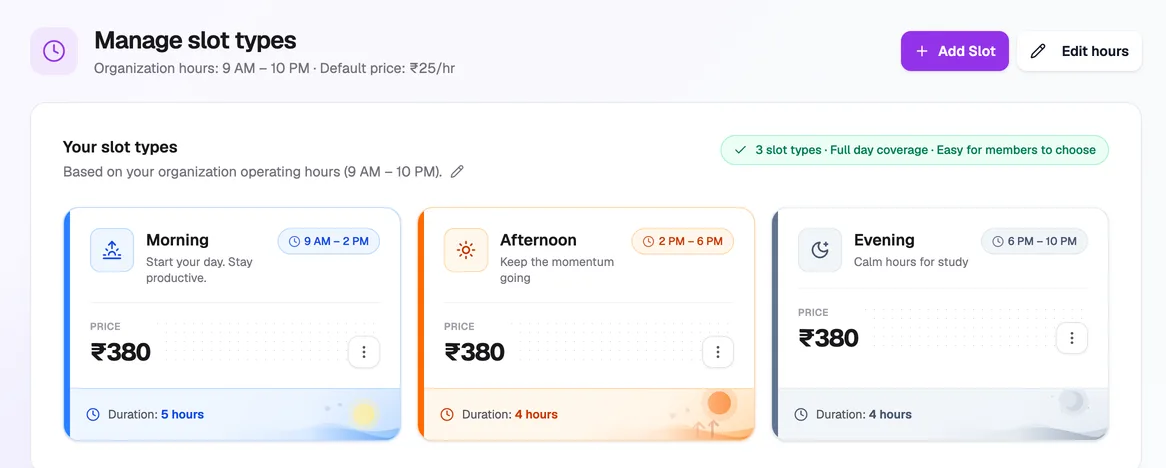
How do you know whose seat is expiring?
The seat map shows every seat with its shifts marked booked, available, expiring soon or expired. Search by a student's name, phone or UID to find their seat. Students get a WhatsApp and email message before their seat expires, and again if it lapses, so fewer renewals slip.
Choose which reminders go out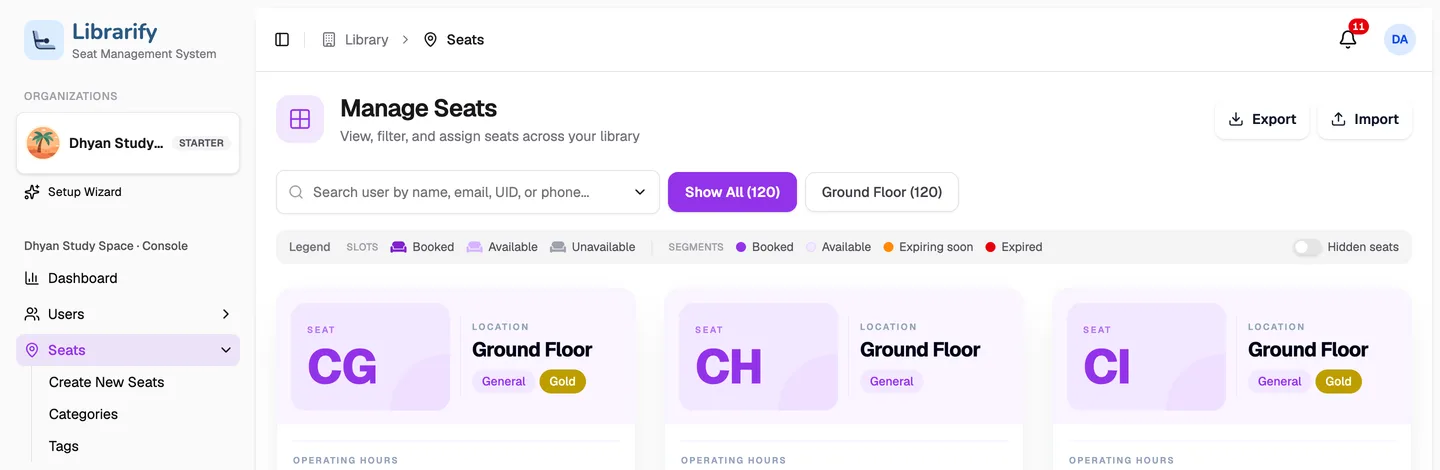
How do renewals, fees and receipts work?
Renewing a seat takes one dialog: pick the new expiry date, enter the amount and how it was paid, and tick Generate receipt. Students can also pay you directly: cash at the desk, a UPI QR for the exact amount that goes straight to your UPI ID, or UPI, card and netbanking through your own Razorpay or Cashfree account. Receipt numbers and the receipt design are yours to set.
How payments work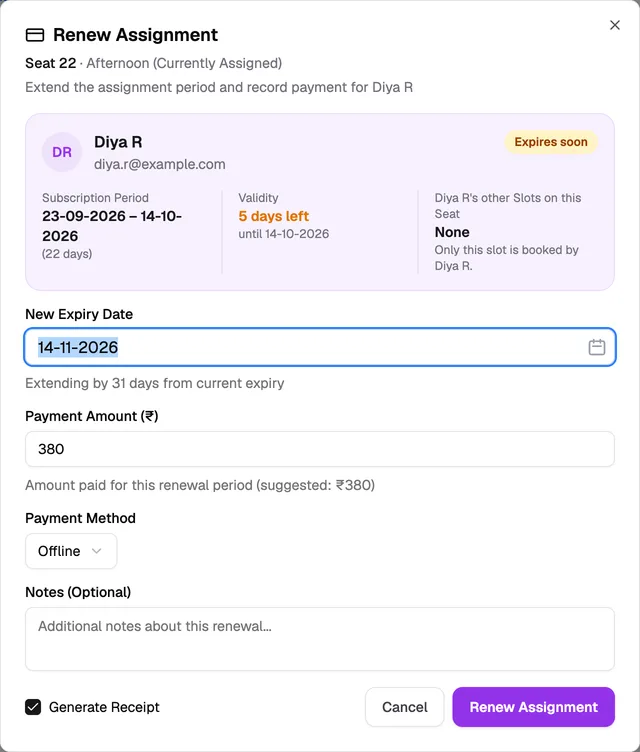
What do your students get?
Every library on Librarify gets its own website, at yourlibrary.librarify.in or on a domain you already own. Students see your seats and prices, reserve a seat or a locker, renew, pay and download their receipts without calling the desk. What they do lands in the same seat map your staff use.
See the library websiteHow much does self-study library software cost?
Priced per library, not per student. Starter covers up to 250 seats and Pro up to 500.
Choose Plan
Switch between plans and intervals anytime.
Refund within 7 days (monthly) or 30 days (yearly).
A free trial is not a paid plan. The refund window starts only after a paid plan starts.
Starter
Basic plan for startersPer month, per library
- WhatsApp and Email renewal notice
- Website
- Custom Domain
- Customizations
- Custom UID and Receipt Generator
- Unique Subdomain
- User Roles
- Four Payment Integrations
- Auto Assignments of Seats
Pro🔥 Most Popular
Pro plan for bigger librariesPer month, per library
- All in Starter plan +
- Multiple website templates
- Multiple email templates
- Multiple Receipt templates
- AI features (coming soon)
Is Librarify right for your library?
- A good fit if you run shifts, have more students than you can track in your head, or want students to book and pay online.
- Maybe not yet if you have under 20 seats and one fixed timing. A register may be enough for now.
- Bigger libraries: Starter covers up to 250 seats and Pro up to 500. If you have more seats or several branches, contact us.
Questions about self-study library software
- What is self-study library software?
- Self-study library software is an app for running a paid study space: which student sits on which seat in which shift, when each membership expires, who has paid, and who needs a reminder. It replaces the paper register, the Excel sheet and the WhatsApp follow-ups.
- Can one seat be sold to more than one student a day?
- Yes. Split your hours into shifts, such as morning, afternoon and evening, each with its own price, and assign the same seat to a different student in each. Seats can also be booked by the hour.
- Does Librarify send fee reminders on WhatsApp?
- Yes. Students can get WhatsApp and email messages when a seat is about to expire, when it has expired and when a payment is due. Your staff can also send a WhatsApp reminder by hand. You choose which messages go out in Settings → Organization → Notifications.
- How do students pay?
- Cash at the desk, a UPI QR for the exact amount that pays straight into your UPI ID, or UPI, card and netbanking through your own Razorpay or Cashfree account. Every payment gets a receipt.
- How much does self-study library software cost?
- Librarify is priced per library, with monthly and yearly billing. Starter covers up to 250 seats and Pro up to 500. Students do not pay Librarify. Current prices are on the pricing page, and you can start with a free trial.
- Do I need to install anything?
- No. Librarify runs in the browser on a phone, tablet or computer, so the owner and the front desk can use it from anywhere. Students use your library's website.
Move your library off the register
Create your library, add your seats and shifts, and start assigning students today. The pricing page lists what each plan includes.